Built for DTF Printers.
Faster Than Anything Else.

Gang Sheet Automator runs entirely on your local machine — no browser, no uploads, no server queues. Most gang sheets build in under 5 seconds. No web-based DTF tool comes close.
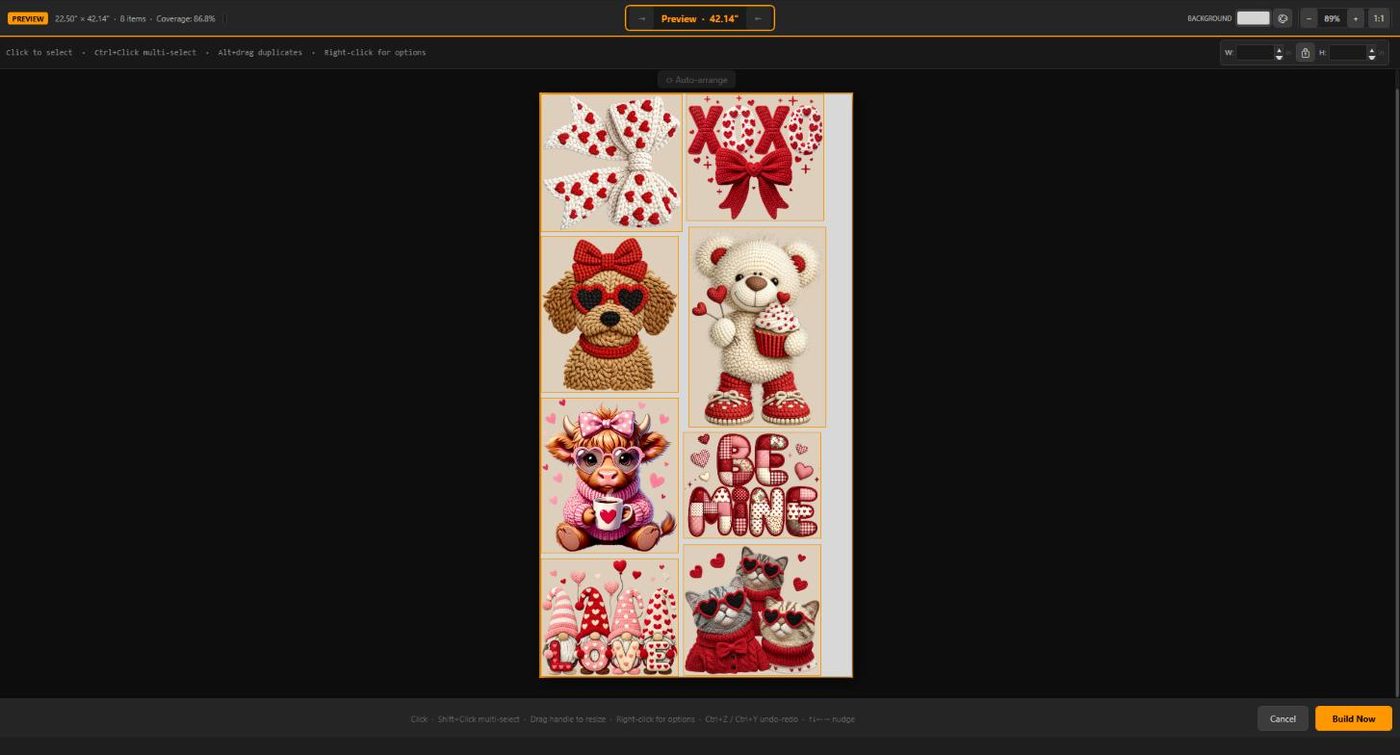
What's Inside

🔬
Edge Sealer 1.0™ Proprietary

Our proprietary Edge Sealer 1.0™ automatically eliminates stray transparent pixels along artwork edges on designs at 200 DPI and under — your transfers print crisp, sharp, helping prevent unwanted white edges on your DTF prints.

✂️
AutoTrim™ Proprietary

Before packing begins, AutoTrim™ scans every design and strips blank transparent space from all sides of the canvas. Oversized artwork files with extra padding pack as tightly as their visible artwork — so no DTF sheet space is ever lost to invisible borders or empty canvas.

SmartNest™ 1.0 Proprietary

Gang Sheet Automator's proprietary SmartNest™ 1.0 engine runs 40 layout passes per build — testing different orderings and rotations — then picks the arrangement that fits the most designs onto the fewest sheets with the least wasted space.

🔄
Auto-Rotation

Designs are tested both upright and rotated 90°. Gang Sheet Automator picks the orientation that wastes the least DTF film, fitting more direct-to-film transfers per sheet without any manual guesswork.

🖼
Multi-Format Artwork Support

Import PNG (raster), SVG (vector), PDF, and Adobe Illustrator .AI DTF artwork files in a single job. Full alpha-channel transparency is preserved throughout the entire pipeline from import to export.

🖨
Print-Ready PNG & PDF Export

Export at 300 DPI with correct DPI metadata embedded. PNG output is print-ready for your DTF RIP software out of the box. PDF output is fully layered — each design remains individually selectable when opened in Adobe Illustrator.

📐
Customizable Sheet Dimensions

Set any sheet width and height in inches. Works with all standard DTF roll widths — 13", 22", 24", and wider. Configure gap spacing between designs for clean, easy cutting between every transfer.

🎯
Per-Design Quantity & Sizing

Set individual print sizes and quantities for each artwork file in your job. Need 10 of one design at 4" and 3 of another at 8"? No problem — it all goes into a single build.

📊
CSV Import & Export

Import entire job lists from a CSV file (path, width, height, quantity, rotate) or export your current job for record-keeping and reordering. Ideal for high-volume DTF print shops managing large order queues.

💾
Layout Save & Load

Save your entire DTF job layout — artwork files, sizes, quantities, and settings — to a JSON file. Reload it any time to rebuild or reprint without re-entering anything.

🔍
DPI Quality Indicator

Each design in your job list shows a quality indicator based on its native DPI vs. your target print size. Spot low-resolution artwork before you build so you never waste a DTF sheet on a blurry direct-to-film print.

🌙
Full Dark Theme

A purpose-built dark UI that's easy on the eyes during long production sessions. Matches the UploadDTF brand and feels right at home on a shop floor monitor.

🚀
Blazing Fast Local Processing

Gang Sheet Automator processes everything on your local machine — your CPU, your RAM, your speed. There are no file uploads, no waiting in a server queue, no 30-second spinners. Drop in your artwork, hit Build, and your gang sheet is ready in seconds. Most jobs with 10–20 designs complete in under 5 seconds. Browser-based direct-to-film tools simply can't match local processing speed.

🖥
Native Windows Desktop App — Built for Speed

Not a web app, not Electron. Gang Sheet Automator is a true native Windows desktop app — all processing happens locally on your machine at full CPU speed. No file uploads, no server queues, no round trips. While web-based tools make you wait for a server to respond, Gang Sheet Automator builds your sheet in seconds. Runs on Windows 10 and 11.

👕
Shirt Size Presets

Not sure what dimensions to use? Select a garment size — Small, Medium, Large, XL, and more — and Gang Sheet Automator automatically fills in the correct DTF print dimensions in inches. No measuring, no Googling, no guessing.

↔️
Customizable Gap Control

Set the exact spacing between every design on your DTF sheet for easy, accurate cutting. Wider gaps give you clear room to cut cleanly between each transfer — scissors, rotary cutters, and guillotines all work better when designs have breathing room. Tighter gaps pack more designs per sheet when cutting room isn't a priority. You control the spacing on every build.

Auto Row Alignment

Smaller DTF designs are automatically grouped and snapped into perfectly aligned rows across the gang sheet. Every edge lines up — so you can trim an entire row in a single straight cut without measuring or adjusting by hand.

🔄
Auto-Updater

Gang Sheet Automator silently checks for updates in the background and keeps itself current. You always have the latest packing improvements and format support without lifting a finger.

Works With Every Format You Use

No conversion, no preprocessing. Drop in your DTF artwork files and go.

PNG — Raster with transparency
SVG — Scalable vector
PDF — Multi-page support
AI — Adobe Illustrator (CS+)

AI files are handled identically to PDF — modern Illustrator files are valid PDFs internally.

Under the Hood

For the technically curious. Every detail is engineered for DTF print accuracy.

Specification Detail
Layout EngineSmartNest™ 1.0 — proprietary multi-pass density optimization with rotation
Image ProcessingLossless high-fidelity raster pipeline
SVG RenderingNative vector renderer at 300 DPI
PDF / AI RasterizationNative PDF engine at 300 DPI
PNG Export DPICorrect DPI metadata embedded — print-ready out of the box
PDF ExportLayered PDF — designs remain individually selectable in Adobe Illustrator
Default Output DPI300 DPI (configurable per design)
Sheet Width RangeAny width in inches — supports all standard DTF roll sizes
PlatformWindows 10 / 11 (x64) — native desktop app
Resize QualityHigh-quality resampling; native-resolution designs skip resampling entirely
Settings PersistenceSaved locally — no cloud account required
UpdatesSilent background auto-updater

Try It Free — 10 Builds on Us

No account required to start. Download the direct-to-film gang sheet builder and run 10 full DTF builds completely free before choosing a plan.